BP101T Unit 1 – Introduction to Python & Basic Concepts
Unit 1 establishes foundational programming literacy in Python 3 for pharmacy students. It covers computing history, Python architecture (bytecode & PVM), IDE environments (IDLE, VS Code, Jupyter, PyCharm), variables, dynamic typing, primitive data types, type casting, mathematical/logical operators, and clinical dosage calculation algorithms (Young's, Dilling's, Clark's, and Fried's rules).
Run Young's and Dilling's dose calculations directly in your browser.
📋 Prescribed Syllabus Topics
📖 Detailed Lecture Notes & Solved Examples
11. History of Computing & The Role of Python in Pharmaceutical Sciences
Dedicated Webpage➔A computer CPU understands only binary machine code (0s and 1s). Low-level assembly languages are machine-specific and difficult to write, while high-level languages like Python use English-like syntax that is translated into machine instructions. Python was created by Guido van Rossum at CWI in the Netherlands in 1989 and released in 1991. Unlike older languages such as C or Fortran, Python emphasizes readability and rapid prototyping. In modern pharmaceutical practice, pharmacists process immense volumes of data — ranging from pediatric dosage scaling and hospital inventory management to high-throughput drug screening and pharmacokinetics. Python eliminates manual mathematical errors, automates quality assurance checks, and handles complex bio-computational tasks with minimal code.Computer ka CPU sirf 0 aur 1 (binary code) samajhta hai. Python ek High-Level interpreted language hai jise 1989 me Guido van Rossum ne banaya tha. Pharmacy me Python ka use bacchon ki exact dose calculate karne, hospital me dawaon ka stock manage karne, aur clinical trials ka data analyze karne ke liye hota hai taaki insani galtiyan na hon.
▶Real-World Scenario: Automated Hospital Dispensary Pediatric Calculator
A pediatric patient aged 4 years weighing 16 kg is prescribed Paracetamol syrup (concentration: 120 mg / 5 mL). The standard adult dose is 500 mg. Instead of relying on manual paper calculations during busy outpatient dispensary hours, an automated Python posology solver computes the exact required dose and the precise liquid volume to dispense.
                            # Automated Pediatric Posology Script
patient_name = "Aarav Sharma"
age_years = 4
weight_kg = 16.0
adult_dose_mg = 500.0
syrup_conc_mg_per_ml = 120.0 / 5.0  # 24.0 mg/mL

# Young's Rule: (Age / (Age + 12)) * Adult Dose
youngs_dose_mg = (age_years / (age_years + 12.0)) * adult_dose_mg
volume_ml = youngs_dose_mg / syrup_conc_mg_per_ml

print(f"Patient: {patient_name}")
print(f"Calculated Single Dose: {youngs_dose_mg:.2f} mg")   # 125.00 mg
print(f"Dispense Volume: {volume_ml:.2f} mL of syrup")        # 5.21 mL
| Feature | Python | C / C++ | Pharmaceutical Advantage |
|---|---|---|---|
| Execution Mode | Interpreted (line-by-line via PVM) | Compiled (direct to binary) | Instant feedback for lab formulas |
| Type Declaration | Dynamic (inferred at runtime) | Static (explicit int, float) | Rapid calculation script creation |
| Syntax Complexity | Clean, whitespace-indented | Verbose with braces & semicolons | Accessible to pharmacists without CS degree |
| Scientific Libraries | NumPy, Pandas, SciPy, Matplotlib | Requires complex third-party setup | Industry standard for bio-data analysis |
- •Python is an interpreted, high-level, dynamically typed, and garbage-collected language.
- •Python code is compiled into intermediate bytecode (.pyc), which executes on the Python Virtual Machine (PVM).
- •Batteries Included philosophy: Python comes standard with rich built-in mathematical, statistical, and file I/O libraries.
22. Python IDEs: IDLE, VS Code, Jupyter Notebook & PyCharm
Dedicated Webpage➔An Integrated Development Environment (IDE) is a software application that consolidates essential developer tools into a single graphical user interface. While a basic text editor (like Notepad) only allows typing text, an IDE provides syntax highlighting, auto-completion (IntelliSense), an integrated debugger, a terminal console, and package management. Different IDEs serve distinct pharmaceutical workflows: Jupyter Notebook is ideal for exploratory pharmacokinetics and step-by-step data analysis, VS Code is a versatile lightweight editor for building complete pharmacy applications, and IDLE is the lightweight default environment bundled with Python.IDE ek aisa software environment hota hai jisme code likhne ke liye editor, galti pakadne ke liye debugger, aur code run karne ke liye terminal ek saath milta hai. Jupyter Notebook me hum step-by-step table aur graph dekh sakte hain, jabki VS Code me pura software banaya jata hai.
▶Comparison of Pharmacy Development Environments
Choosing the right tool for laboratory work: Jupyter Notebook allows running individual cells of code to visualize graphs inline alongside chemical explanations, while VS Code is used for building multi-file laboratory management systems.
                            # Running an inline calculation cell in Jupyter Notebook
import math
half_life_hours = 3.5
elimination_rate_k = math.log(2) / half_life_hours
print(f"Elimination rate constant (Ke): {elimination_rate_k:.4f} hr^-1")
| IDE Name | Best Used For | Key Advantage for Pharmacy | Learning Curve |
|---|---|---|---|
| IDLE | Quick syntax tests & simple scripts | Zero installation needed (comes with Python) | Very Low |
| Jupyter Notebook | PK graphing & statistical analysis | Interactive cell-by-cell execution with inline charts | Low |
| VS Code | Multi-file pharmacy desktop/web apps | Fast, modular, extensive extensions support | Moderate |
| PyCharm | Large enterprise pharmaceutical systems | Advanced debugging and code refactoring tools | Moderate to High |
🛠️Beginner's Step-by-Step Installation Guide
No previous coding experience needed! Follow these simple visual steps to set up Python and your choice of coding workbench on your computer.
To write and run code, you only need two things:
The behind-the-scenes brain that calculates your pediatric dosages and solves pharmacy math.
The screen where you type code with color-coding and automatic spelling/error checks.
Installing Python 3 (The Core Engine)
Required on all computers to run pharmaceutical scriptsPython reads your instructions almost like plain English. When you install Python, you get the interpreter that executes your calculations (like Young's Rule child doses or drug solubility).
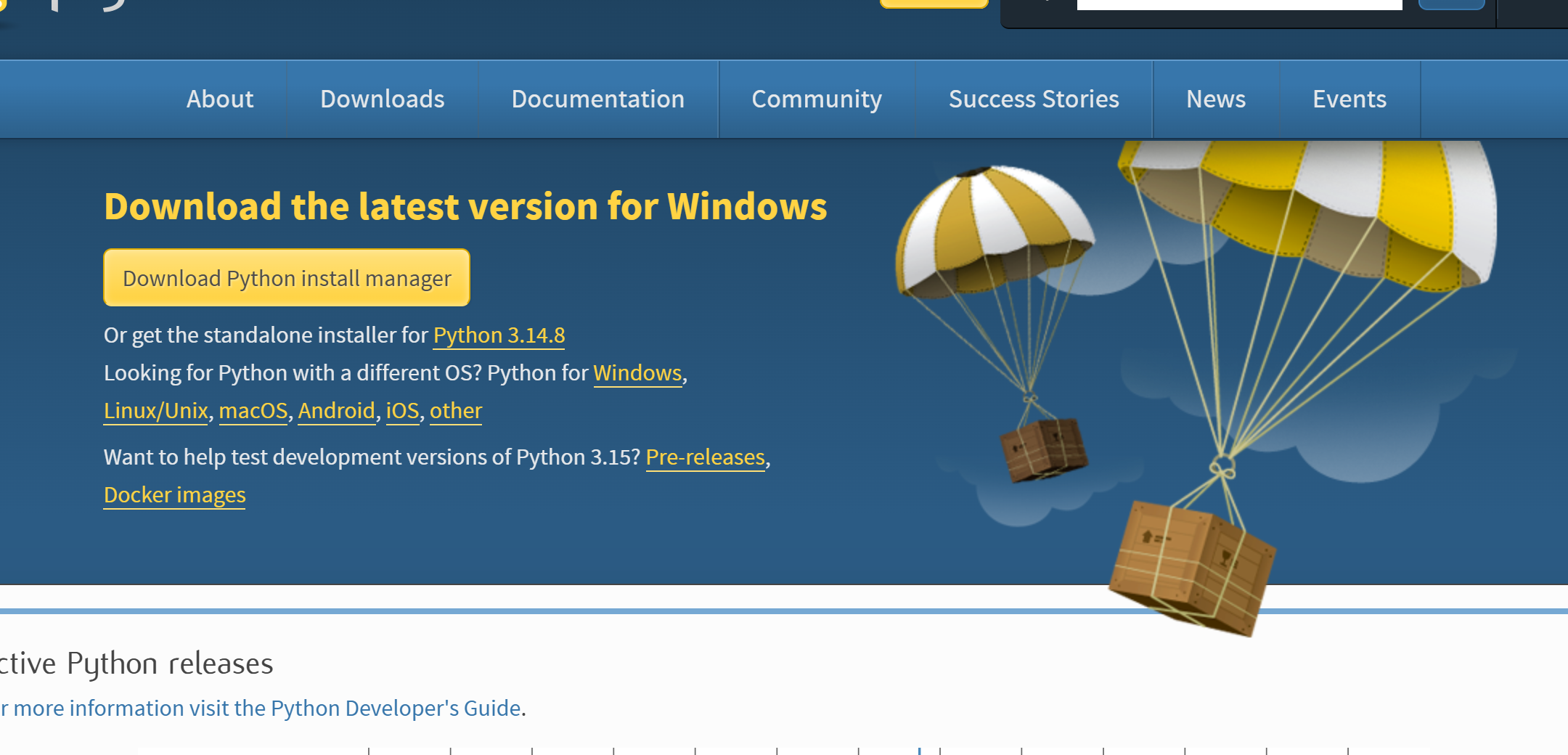
- 1.Download: Open your browser, go to python.org/downloads, and click the yellow "Download Python" button.
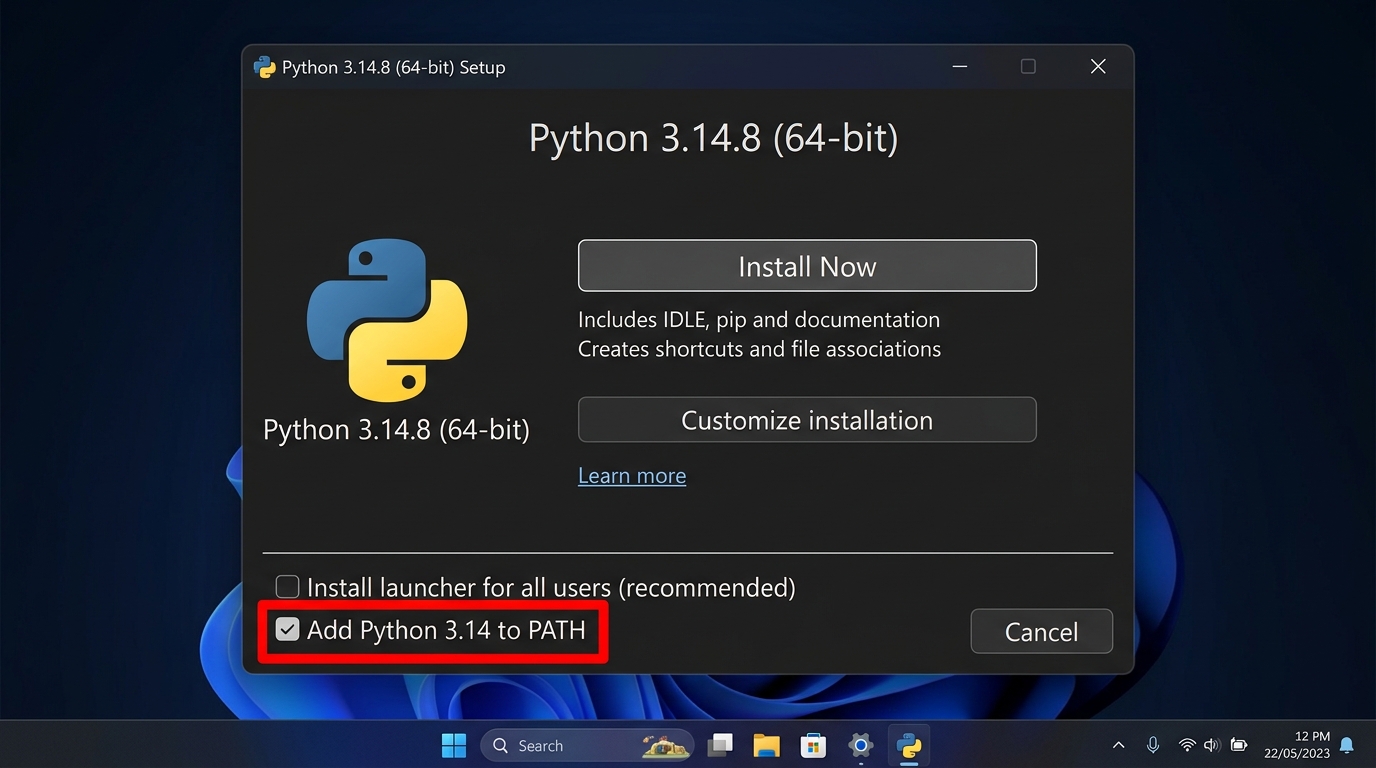
- 2.Tick the PATH Checkbox (Most Important!): Double-click the downloaded file. On the very first window, look at the bottom and check the box: "Add python.exe to PATH". This lets your computer recognize Python commands everywhere.
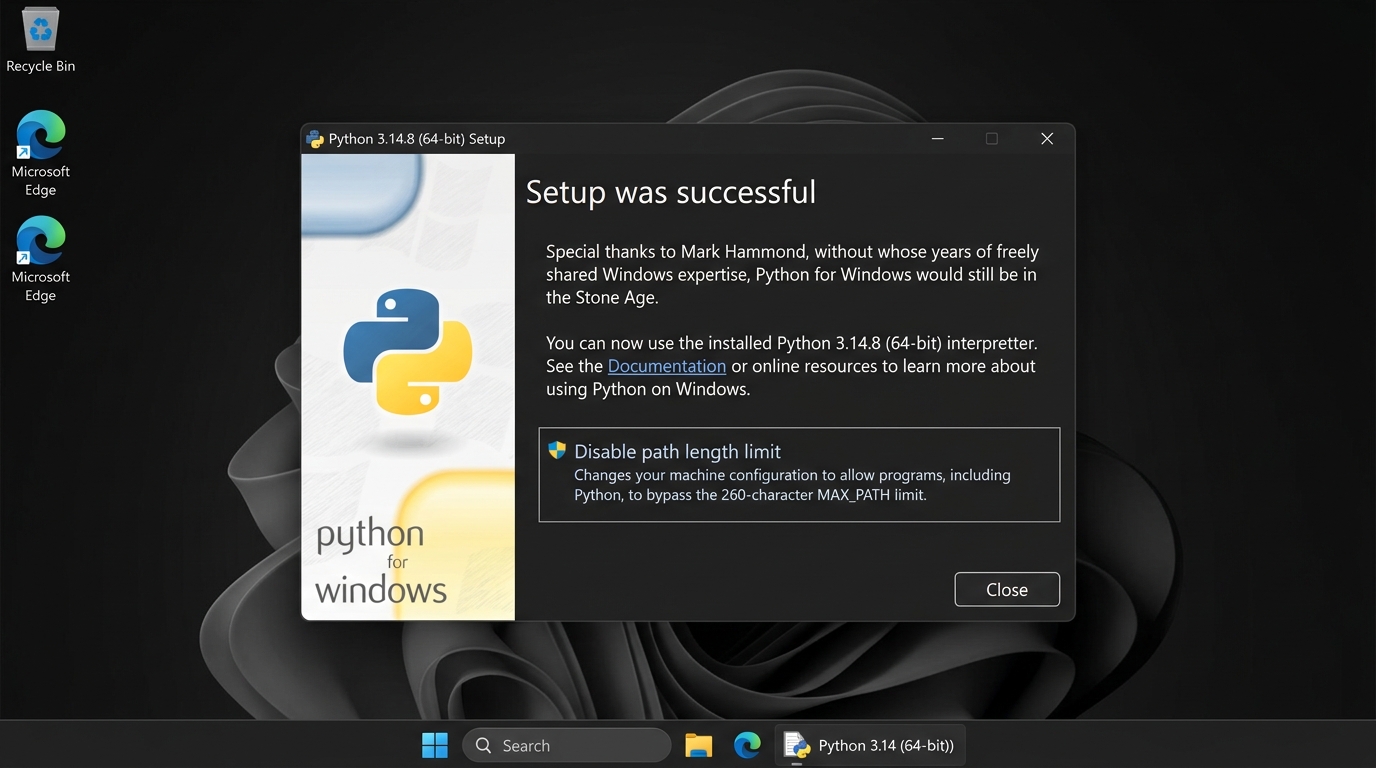
- 3.Click Install Now: Click the top option "Install Now" and wait 1–2 minutes for the progress bar to finish.
- 4.Verify: Press Windows Key + R, type
cmd, press Enter, and typepython --version. If you see Python 3.x, you are 100% ready!
Visual Studio Code (Your Smart Coding Notebook)
Best free code editor by MicrosoftThink of VS Code like Microsoft Word with spellcheck for programming. When you make a typing mistake, VS Code shows a red wavy line immediately so you can fix it before running your lab calculation.
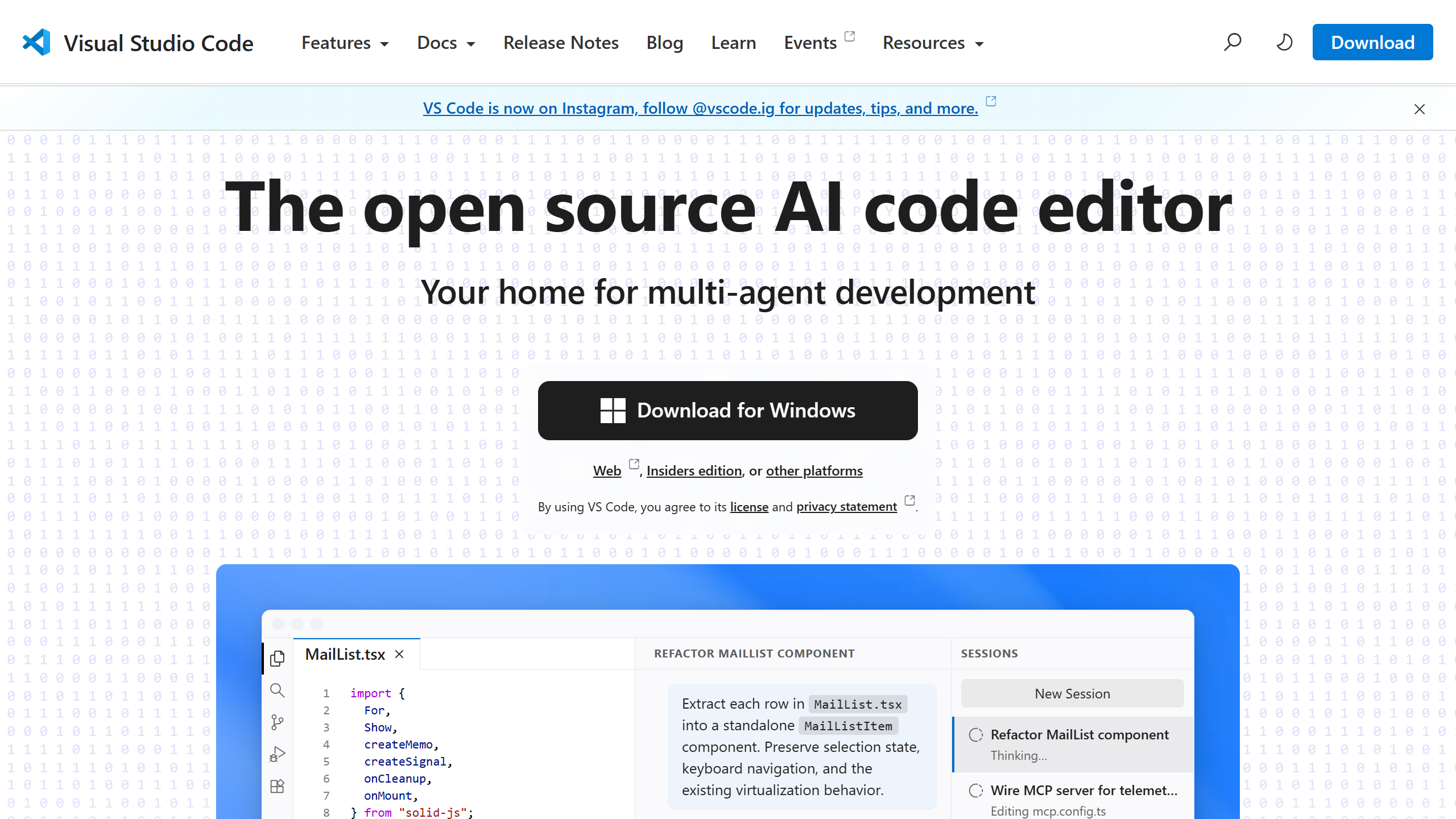
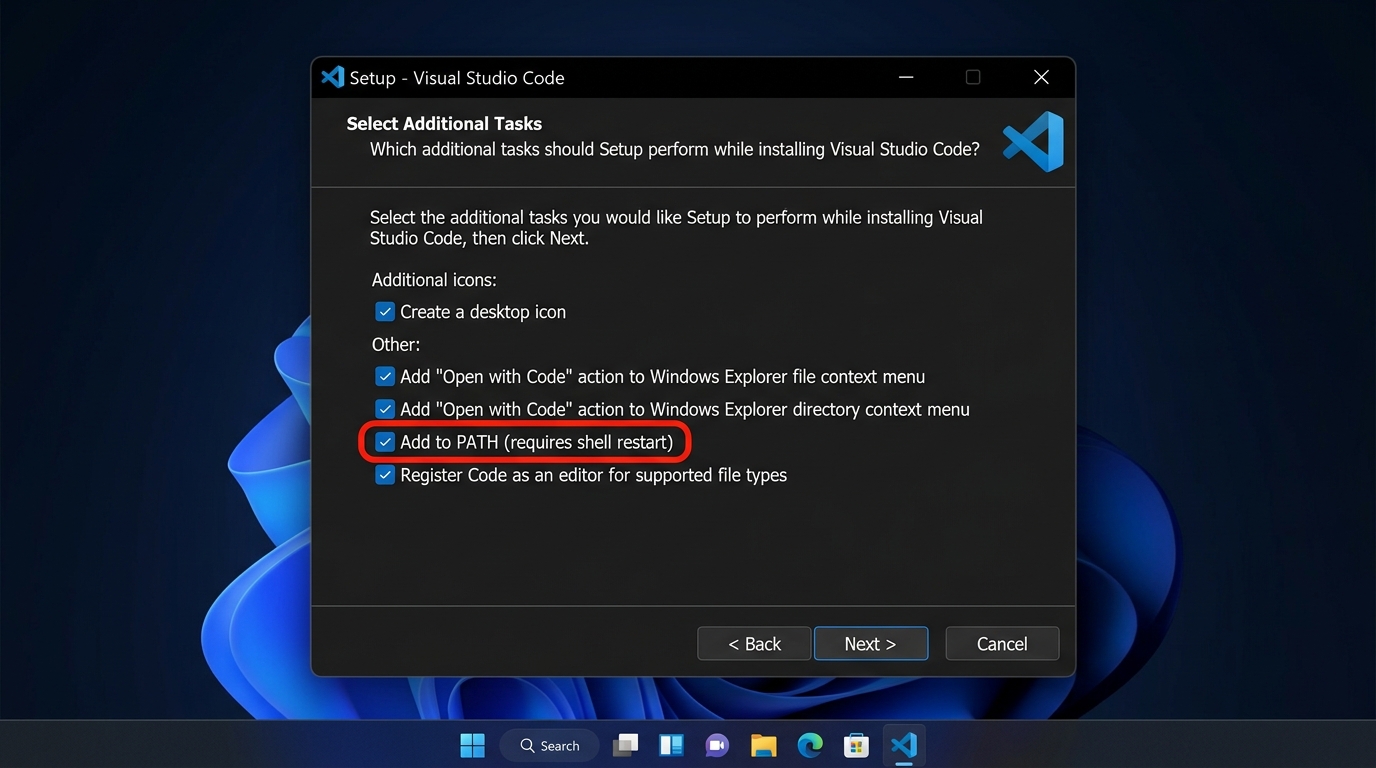
- 1.Download & Install: Go to code.visualstudio.com, download the Windows installer, and install it.
- 2.Install the Python Plugin: Open VS Code, press Ctrl + Shift + X (or click the 4-squares icon on the left), search for "Python" by Microsoft, and click Install.
- 3.Write & Run Code: Click File → New File, save it as
dose.py, type your formula, and click the triangle "▷ Play" button in the top-right corner to see the result!
Jupyter Notebook (Your Interactive Lab Worksheet)
Best for graphing drug concentration & pharmacokineticsJupyter Notebook opens directly in your web browser. Instead of running a long program all at once, you can run one line at a time and see your drug concentration graphs and chemistry tables right below your code!
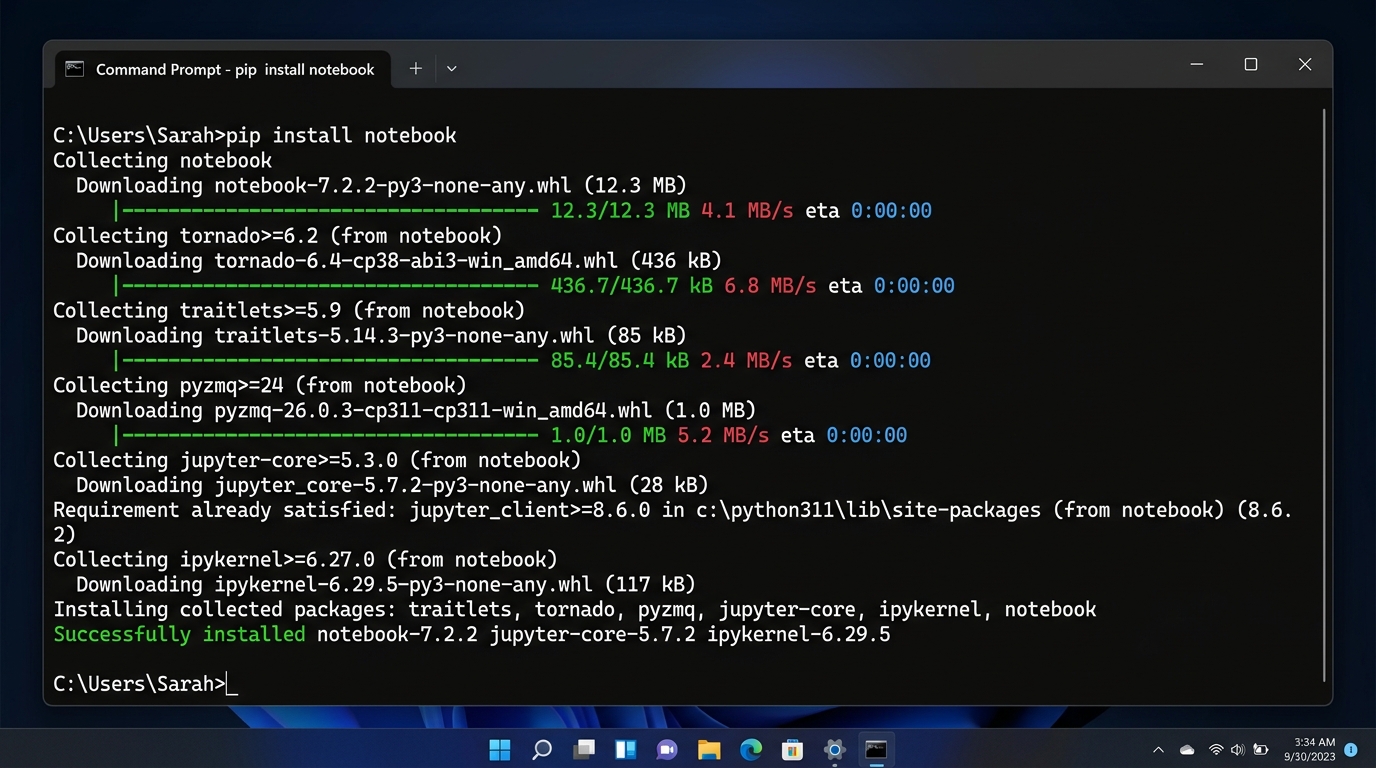
pip install notebook in Command Prompt.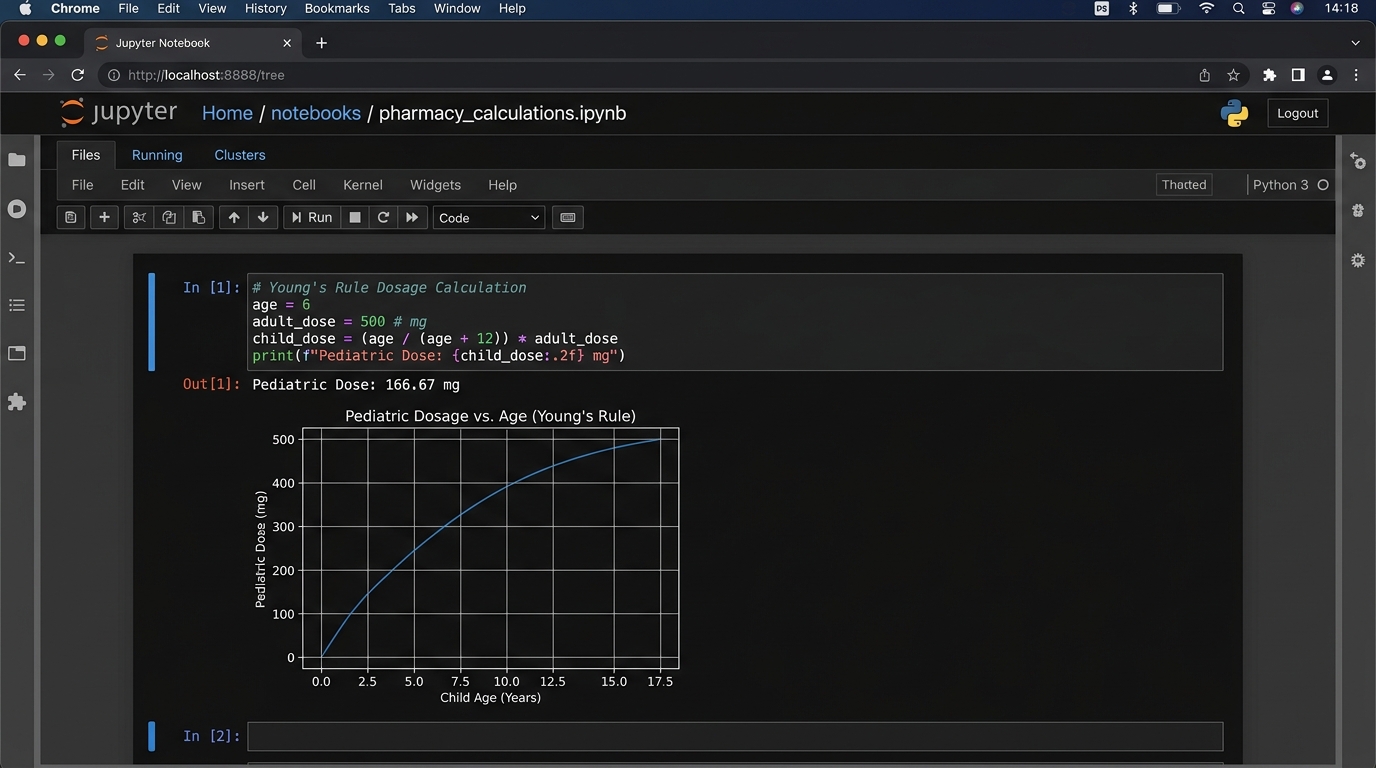
- 1.Install via Pip: Open Command Prompt and type:
pip install notebook, then press Enter. - 2.Launch: Type
jupyter notebookand press Enter. It automatically opens in your Chrome or Edge browser. - 3.Run Calculations: Click New → Python 3, type your math formula into the box, and press Shift + Enter to see the answer immediately underneath.
PyCharm Community Edition (Dedicated Workshop)
Professional dedicated Python IDE by JetBrainsPyCharm is a specialized Python IDE that keeps all your pharmacy project files, calculations, and virtual environments cleanly organized in one window.

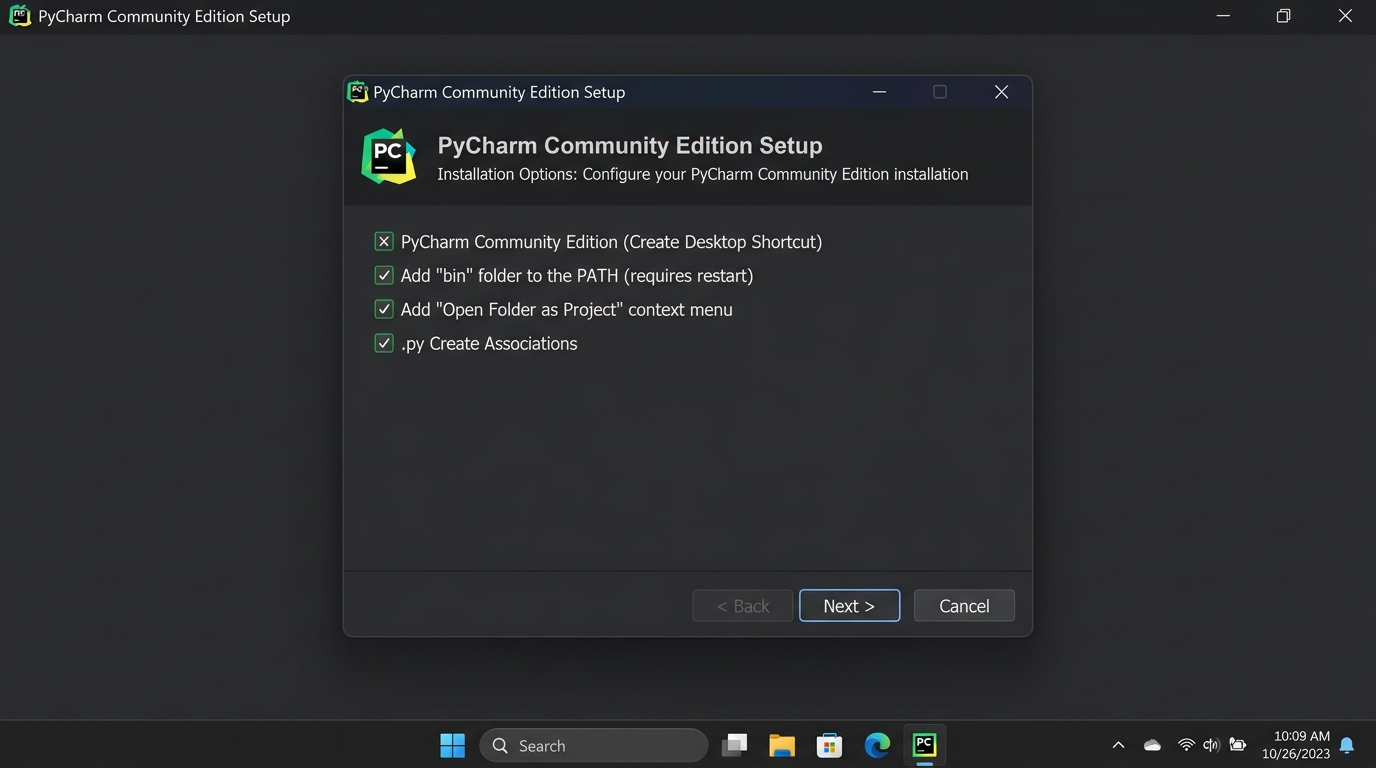
- 1.Download Free Version: Visit jetbrains.com/pycharm/download and download the free **Community Edition**.
- 2.Install: Run the installer and check the box "Add bin folder to PATH".
- 3.Start Project: Open PyCharm, click "New Project", and click "Create".
Google Colab (Zero-Install Online Option)
Works directly in your phone or laptop browser without installing anythingGoogle Colab is like Google Docs for Python programming. You don't need to install anything on your laptop. All scientific packages (numpy, pandas, matplotlib) are already built-in, and your work saves automatically to Google Drive.
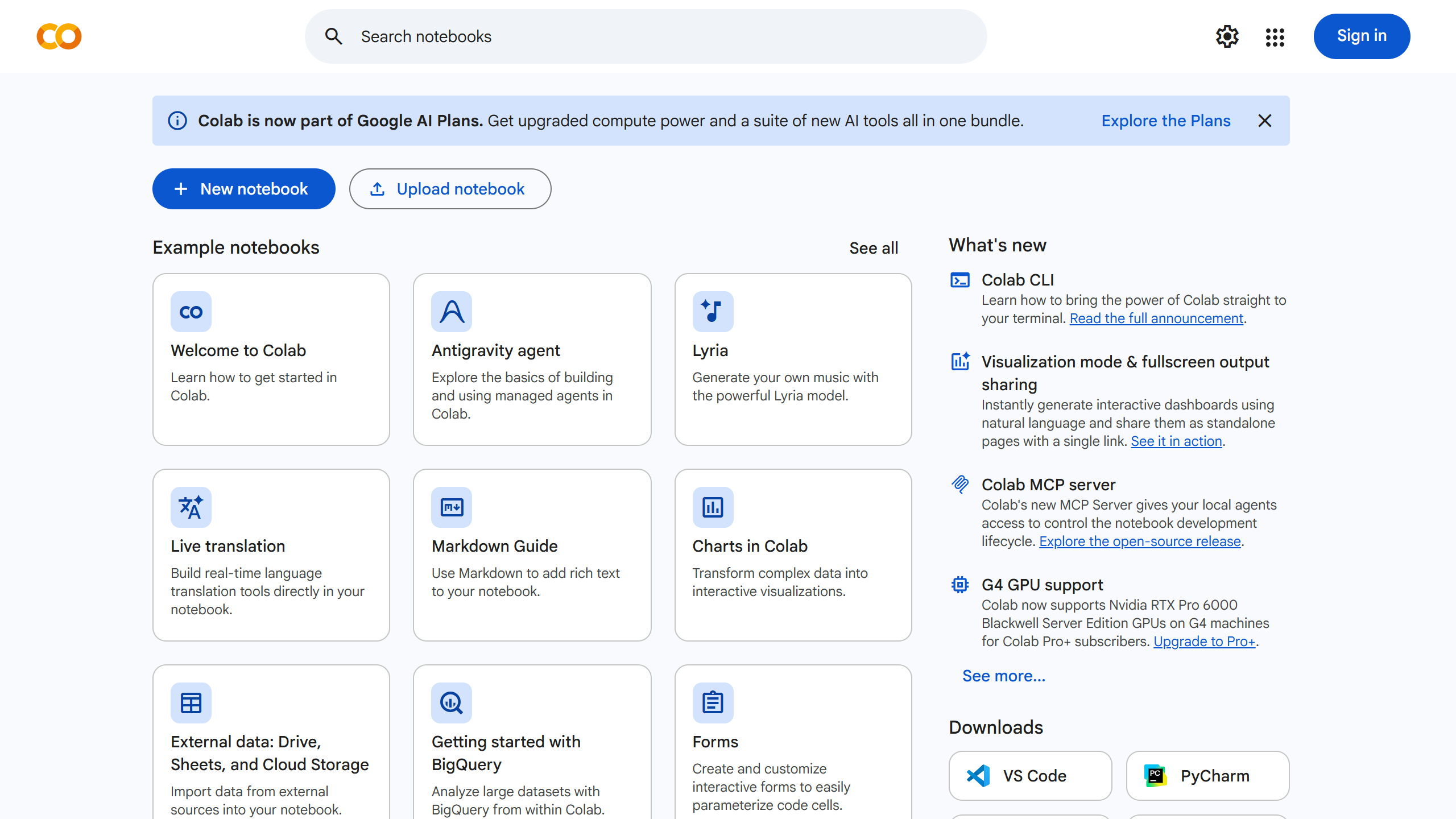
- 1.Open Colab: Visit colab.research.google.com in your browser.
- 2.Sign In: Log in with your regular Google / Gmail account.
- 3.Calculate & Share: Click "New Notebook", write your formula, press Shift + Enter, and click Share to submit practical assignments to your teacher!
- •IDLE: Bundled with Python, lightweight, suitable for absolute beginners learning basic syntax.
- •VS Code: Open-source, highly extensible via plugins (Python, Pylance), integrated terminal, Git version control.
- •Jupyter Notebook: Cell-based execution, displays tables, markdown notes, and Matplotlib plots inline; standard in data science.
- •PyCharm: Professional full-featured IDE with deep static code analysis and virtual environment managers.
33. Variables, Primitive Data Types & Type Casting in Lab Calculations
Dedicated Webpage➔A variable is a named reference to a memory location that stores data. In Python, variables are created automatically when you assign a value using the assignment operator (=). Python has four fundamental primitive data types: int (whole numbers like tablet counts), float (decimal numbers like pH or weight in grams), str (text strings like drug names), and bool (logical True or False flags). Because console input via `input()` always returns a string, explicit type casting (converting string to float or integer) is mandatory before performing mathematical operations.Variable memory me data store karne ka ek naam hai. Python me 4 basic data types hote hain: int (poore numbers jaise 100 tablets), float (point wale numbers jaise pH 7.35 ya weight 50.5 kg), str (text jaise drug name 'Paracetamol'), aur bool (True/False). User input hamesha text hota hai, isliye calculation se pehle float() ya int() lagana zaroori hai.
▶Laboratory Formulation Record with Type Casting
Capturing raw analytical data from user input, casting it to float values, and calculating percentage drug purity.
                            # Capturing analytical assay inputs
drug_name = "Amoxicillin Trihydrate"      # str
batch_number = "BT2026-09"                # str
label_claim_mg = 500.0                    # float
tested_amount_str = "492.5"               # str from instrument

# Explicit Type Casting
tested_amount_mg = float(tested_amount_str) # Cast str to float
purity_percent = (tested_amount_mg / label_claim_mg) * 100.0
is_within_limits = 90.0 <= purity_percent <= 110.0  # bool

print(f"Drug: {drug_name} (Batch: {batch_number})")
print(f"Assay: {purity_percent:.2f}% | IP Standard Met: {is_within_limits}")
| Data Type | Python Syntax | Pharmaceutical Example | Memory Characteristics |
|---|---|---|---|
| Integer (int) | count = 100 | Number of vials, tablets, patient age in years | Arbitrary precision whole numbers |
| Float (float) | ph_val = 7.35 | Drug concentration (mg/mL), body weight (kg), melting point (°C) | 64-bit double precision (IEEE 754) |
| String (str) | drug = 'Aspirin' | Drug names, chemical formulas, batch codes | Immutable sequence of Unicode characters |
| Boolean (bool) | passed = True | Sterility pass/fail flags, QC inspection checks | Subtype of integer (True = 1, False = 0) |
- •Variable Naming Rules: Must start with a letter (a-z, A-Z) or underscore (_); cannot start with a digit; case-sensitive (`dose` != `Dose`).
- •Dynamic Typing: The variable's type is determined by the assigned object at runtime.
- •Type Casting Functions: `int()` converts to whole number, `float()` converts to decimal, `str()` converts to text, `bool()` converts to boolean.
- •F-Strings: Modern string formatting syntax `f'Dose: {val:.2f} mg'` allows clean, formatted output.
44. Python Operators: Arithmetic, Relational, Logical & Assignment
Dedicated Webpage➔Operators are special symbols in Python that execute arithmetic calculations, comparisons, and logical evaluations on operands (variables and values). In pharmaceutical computing, arithmetic operators compute dilution factors and body surface areas; relational operators compare lab test values against pharmacopoeial monographs; logical operators combine multiple release criteria (e.g., hardness AND dissolution); and assignment operators update running batch totals.Operators wo symbols hain jinse hum calculation karte hain. Arithmetic operators (+, -, *, /) se dosage aur dilution nikalte hain; Relational operators (>=, <=, ==) se check karte hain ki tablet IP limits me hai ya nahi; aur Logical operators (and, or, not) se multiple quality pass conditions ek saath check karte hain.
▶Comprehensive Batch Release Quality Check Script
Demonstrating arithmetic, relational, and logical operators in evaluating finished tablet batches.
                            # Batch quality parameters
tablet_hardness_kg = 5.8
disintegration_time_min = 11.5
friability_percent = 0.65

# Relational & Logical Operators for IP Tablet Release
# Standards: Hardness >= 4.5 kg, DT <= 15 min, Friability <= 1.0%
hardness_ok = tablet_hardness_kg >= 4.5
dt_ok = disintegration_time_min <= 15.0
friability_ok = friability_percent <= 1.0

# Logical AND operation: All 3 criteria must be True
batch_passed = hardness_ok and dt_ok and friability_ok

print(f"Hardness Test: {hardness_ok} | DT Test: {dt_ok} | Friability Test: {friability_ok}")
print(f"Final Batch Commercial Release: {batch_passed}")
- •Arithmetic Operators: `+` (add), `-` (subtract), `*` (multiply), `/` (float divide), `//` (floor/integer divide), `%` (modulus/remainder), `**` (exponentiation/power).
- •Relational Operators: `==` (equal), `!=` (not equal), `>`, `<`, `>=`, `<=` (return boolean True/False).
- •Logical Operators: `and` (True if both are true), `or` (True if at least one is true), `not` (inverts boolean value).
- •Compound Assignment: `+=`, `-=`, `*=`, `/=` modify variables in place efficiently.
55. Pediatric & Geriatric Posology Algorithms: Complete Mathematical Formulations
Dedicated Webpage➔Posology is the branch of pharmaceutical medicine that deals with drug dosage determination. Children have immature hepatic metabolism and reduced renal clearance, while elderly patients experience reduced organ perfusion. Consequently, adult doses cannot be given directly. Posology rules use age, weight, or body surface area (BSA) to calculate safe and effective individualized doses.Posology ka matlab hai dawa ki sahi dose tay karna. Bacchon ke liver aur kidney bado jaise viksit nahi hote, isliye adult dose ko direct nahi de sakte. Iske liye 4 main rules hain: Young's Rule (1-12 saal ke bacchon ke liye), Dilling's Rule (4-20 saal ke liye), Clark's Rule (wajan ke hisaab se), aur Fried's Rule (2 saal se chhote infants ke liye).
▶Multi-Rule Pediatric Calculator Script in Python
Implements Young's, Dilling's, Clark's, and Fried's rules with validation.
                            def calculate_pediatric_doses(adult_dose_mg, age_years=None, age_months=None, weight_kg=None, weight_lbs=None):
    results = {}

    # 1. Young's Rule (Ages 1-12 years): Dose = (Age / (Age + 12)) * Adult Dose
    if age_years is not None and 1 <= age_years <= 12:
        results["Young's Rule"] = (age_years / (age_years + 12.0)) * adult_dose_mg

    # 2. Dilling's Rule (Ages 4-20 years): Dose = (Age / 20) * Adult Dose
    if age_years is not None and age_years >= 4:
        results["Dilling's Rule"] = (age_years / 20.0) * adult_dose_mg

    # 3. Clark's Rule (Weight-based): Dose = (Weight in lbs / 150) * Adult Dose
    # Or in kg: Dose = (Weight in kg / 70) * Adult Dose
    if weight_kg is not None:
        results["Clark's Rule (kg)"] = (weight_kg / 70.0) * adult_dose_mg
    elif weight_lbs is not None:
        results["Clark's Rule (lbs)"] = (weight_lbs / 150.0) * adult_dose_mg

    # 4. Fried's Rule (Infants < 1 year / up to 24 months): Dose = (Age in months / 150) * Adult Dose
    if age_months is not None and age_months <= 24:
        results["Fried's Rule"] = (age_months / 150.0) * adult_dose_mg

    return results

# Test for a 5-year-old child weighing 18 kg, adult dose = 250 mg
calculated = calculate_pediatric_doses(adult_dose_mg=250.0, age_years=5, weight_kg=18.0)
for rule, dose in calculated.items():
    print(f"{rule}: {dose:.2f} mg")
| Posology Rule | Mathematical Formula | Target Age / Patient Group | Clinical Notes |
|---|---|---|---|
| Young's Rule | Dose = (Age / (Age + 12)) * Adult Dose | Children 1 - 12 Years | Standard classical rule for school-age children |
| Dilling's Rule | Dose = (Age / 20) * Adult Dose | Children 4 - 20 Years | Easier mental arithmetic; reliable for adolescents |
| Clark's Rule | Dose = (Weight_kg / 70) * Adult Dose | Any Child with known weight | Most accurate for malnourished or obese children |
| Fried's Rule | Dose = (Months / 150) * Adult Dose | Infants < 2 Years (0-24 months) | Specifically tailored for infant hepatic clearance |
- •Young's Rule: $\text{Child Dose} = \frac{\text{Age in Years}}{\text{Age in Years} + 12} \times \text{Adult Dose}$ (Applicable for children 1 to 12 years).
- •Dilling's Rule: $\text{Child Dose} = \frac{\text{Age in Years}}{20} \times \text{Adult Dose}$ (Simpler formula, preferred for children 4 to 20 years).
- •Clark's Rule: $\text{Child Dose} = \frac{\text{Weight in kg}}{70} \times \text{Adult Dose}$ or $\frac{\text{Weight in lbs}}{150} \times \text{Adult Dose}$ (Physiologically superior when weight deviates from age average).
- •Fried's Rule: $\text{Infant Dose} = \frac{\text{Age in Months}}{150} \times \text{Adult Dose}$ (Strictly for infants under 1 to 2 years of age).
🎯 Solved University Calculation Problem
Question: A physician prescribes Amoxicillin to a 6-year-old child weighing 20 kg. The standard adult dose is 500 mg every 8 hours. Calculate the single dose using: (a) Young's Rule, (b) Dilling's Rule, and (c) Clark's Rule (kg basis). Compare the results.
- In practical exam viva, remember: `input()` returns `str`. If you forget `float()`, adding numbers results in text concatenation (`'500' + '100' = '500100'`).
- Young's Rule divisor is `(Age + 12)`, while Dilling's Rule divisor is a constant `20`.
- Always validate user inputs against negative values or division by zero in defensive pharmacy scripts.